
Always On Availability Groups are the default answer to SQL Server high availability and disaster recovery, and they are also where a lot of teams get their first 2 a.m. outage. The technology is solid; the trouble almost always comes from the parts around it — the cluster, quorum, and the way applications connect.
This is a conceptual and troubleshooting guide, not a click-through install. If you understand what an Availability Group actually is and how it fails, the setup screens make sense on their own — and you'll know what to look at when a replica stops synchronizing.
What an Availability Group actually is
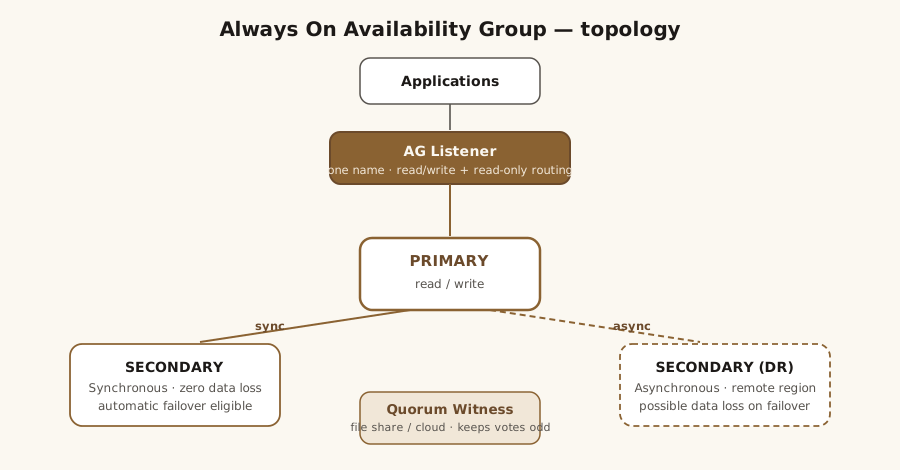
An Availability Group (AG) is a set of databases that fail over together as a unit. One replica is the primary (read-write); up to several secondaries hold synchronized copies and can serve read-only workloads or take over on failover.
Two settings get conflated constantly, so keep them separate in your head:
- Availability mode — how data gets to a secondary: synchronous (wait for the secondary to harden the log) or asynchronous (don't wait).
- Failover mode — whether failover is automatic or manual.
Automatic failover is only possible on a synchronous replica. That single rule explains most "why didn't it fail over?" questions.
Prerequisites: WSFC, quorum, and witness
AGs run on top of Windows Server Failover Clustering (WSFC) — even though, unlike a failover cluster instance, they don't need shared storage. The cluster's job here is health monitoring and, crucially, quorum: deciding which nodes are allowed to form the cluster so you never get two halves each thinking they're in charge.
Quorum is where real incidents are made. Each node (and the witness) gets a vote; the cluster stays up while a majority of votes is reachable. An even number of votes with no witness is a coin flip waiting to happen. Your witness options are a file share, a cloud (Azure) witness, or a disk — pick one so the vote count is odd and a single failure can't take quorum below the line. The most common "the whole AG went down" story is not a database problem at all; it's quorum loss.
Listeners and read-only routing
The listener is the virtual name and IP that applications connect to. Point apps at the listener, never at a node name — that's the entire mechanism by which a failover is transparent to the application.
Two things to get right in the connection string:
MultiSubnetFailover=Truefor multi-subnet clusters, so the client connects quickly to whichever subnet currently owns the listener.ApplicationIntent=ReadOnlyplus a configured read-only routing list, so reporting and backup workloads land on a secondary instead of taxing the primary.
Synchronous vs. asynchronous replicas
Synchronous commit means the primary waits for the secondary to harden each log block before it acknowledges the commit — zero data loss, at the cost of added latency (you'll see it as HADR_SYNC_COMMIT waits). Asynchronous commit doesn't wait: great for a distant DR site, but a failover there can lose the last few transactions.
A common, sensible topology is a synchronous pair in the primary datacenter (for automatic, zero-loss local HA) plus an asynchronous replica in a second region (for DR). Distance and network latency, not licensing, are what cap how far synchronous can reasonably stretch.
Automatic vs. manual failover
For automatic failover you need three things lined up: a secondary in synchronous commit, set to automatic failover mode, and currently healthy and synchronized. The cluster's flexible failover policy — the health-check timeout and failure-condition level — decides how aggressively an unhealthy primary triggers a failover.
Manual failover comes in two flavors. A planned manual failover (from a synchronized secondary) is lossless and routine — use it for patching. A forced failover is the emergency option and can lose data; you only reach for it when the primary is gone and you're accepting the async gap on purpose.
Common failures: split-brain and quorum loss
Three failure modes cover most pages you'll get:
- Quorum loss — the cluster can't reach a majority of votes; databases drop into Resolving and go offline. The fix is restoring the vote majority (bring a node back, or adjust the witness), not touching the databases.
- Split-brain — two replicas each believe they're primary, usually after a forced failover during a network partition. Prevention is proper quorum plus discipline about forced failover.
- Suspended data movement / "Not Synchronizing" — a secondary that has fallen behind or been paused; log send queue and redo queue tell you which.
A few things teams miss
- Seeding a new replica. You either restore a backup and join the database, or use automatic seeding, which streams it over the AG endpoint. Automatic seeding is convenient but competes for network bandwidth and can saturate the link on large databases — schedule accordingly.
- Backups can run on a secondary. Set the AG's backup preference and take
COPY_ONLYfull backups on a readable secondary to offload the primary. Log backups still form a single chain across all replicas — don't run competing log backups on more than one. - An AG is not a backup. Replicas faithfully reproduce a bad
DELETEorDROPon every copy. You still need real backups, restore tests, andDBCC CHECKDB— the AG protects against a server dying, not against a mistake.
A troubleshooting checklist
Work top-down — cluster, then quorum, then replicas, then connectivity:
- Cluster health and node membership (Failover Cluster Manager /
Get-ClusterNode). - Quorum configuration and current vote count.
- Replica and database state via the AG dashboard and the
sys.dm_hadr_*DMVs (sys.dm_hadr_availability_replica_states,sys.dm_hadr_database_replica_states). - Synchronization health: log send queue and redo queue sizes.
- Listener and DNS resolution from an actual application host.
For live session-level digging while an AG is misbehaving, Adam Machanic's free sp_whoisactive is the fastest way to see what's running and blocking on the primary.
If your HA/DR design needs a second set of eyes — or a failover actually went sideways — that's core SQL Server DBA consulting work. See real client results or get in touch. Availability Groups are also a standard checkpoint in a SQL Server health check and a key decision in any SQL Server migration.
References
- Always On Availability Groups overview — Microsoft Learn. Overview of always on availability groups sql server — Microsoft Learn
- WSFC quorum & witness — Microsoft Learn. Windows server failover clustering wsfc with sql server — Microsoft Learn
- sp_whoisactive — Adam Machanic. sp_whoisactive (whoisactive.com)