
There's a specific bug report every SQL Server DBA hears: "the same stored procedure is instant for me and takes 40 seconds for accounting," or "it was fine yesterday and now it's crawling — we didn't change anything." Nine times out of ten, that's parameter sniffing. The good news is it's fixable. The bad news is the popular fixes often make it worse.
This walks through what parameter sniffing actually is, how to confirm it, and how to choose a fix that solves the problem instead of hiding it.
What parameter sniffing actually is
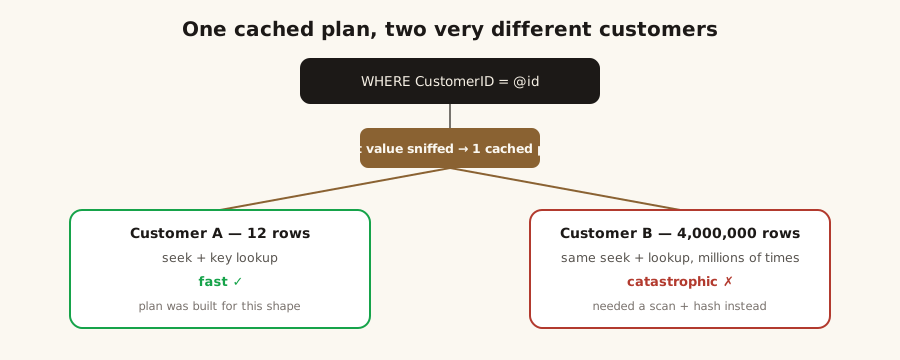
When you run a parameterized query or stored procedure, SQL Server compiles an execution plan using the first parameter values it happens to see, then caches that plan and reuses it for every later execution — regardless of the values passed next time.
That's not a bug. It's how the optimizer normally gets a good plan cheaply: sniff the value, build a plan tuned for it, reuse it. The problem only appears when your data is skewed and a single cached plan has to serve wildly different inputs.
Why the same query varies wildly
Picture a WHERE CustomerID = @id query. One customer has 12 orders; another has 4 million. A plan built for the 12-row customer (nested loops, index seeks, key lookups) is perfect for them and catastrophic for the 4-million-row customer — and vice versa. Whichever value compiles the plan "wins," and everyone else lives with it.
That's also why "it was fine yesterday" is real: anything that forces a recompile — a statistics update, cache eviction, a service restart, a failover — lets a different first value seize the plan. Same code, different sniffed value, opposite performance.
Diagnosing it with Query Store and plans
Query Store makes this almost easy. In Top Resource Consumers, a query that has multiple cached plans and a wide spread in duration is the classic fingerprint. Open the two plans side by side and compare estimated vs. actual rows — a plan built for a few rows now being fed millions (or the reverse) is your confirmation.
At the plan-cache level, sys.dm_exec_query_stats joined to sys.dm_exec_query_plan shows the same story: one query hash, very different runtimes. Confirm it's sniffing before you reach for a fix, because "missing index" and "stale statistics" look similar from a distance and have different answers.
Fixes: from surgical to blunt
Order matters here — reach for the most targeted fix first:
OPTION (RECOMPILE)— compile a fresh plan on every execution using the actual values. Excellent for genuinely volatile parameters; the cost is compile CPU, so keep it off hot OLTP paths that run thousands of times a second. Use it at the statement level —CREATE PROCEDURE … WITH RECOMPILErecompiles the entire procedure on every call, a blunter and costlier hammer.OPTIMIZE FOR (@id = <value>)— pin the plan to a representative value you choose. Good when there's a "usually this shape" case.OPTIMIZE FOR UNKNOWN— ignore the sniffed value and plan from the column's average density. A reasonable, boring middle plan; rarely great, rarely terrible.- Forced plans (Query Store) / plan guides — pin a known-good plan without touching code. Useful for third-party apps you can't change.
- Fix the root cause — the real win: a better index, updated or filtered statistics, or splitting one do-everything query into paths for the small and large cases.
- Disable parameter sniffing (database-scoped configuration / trace flag) — the blunt instrument. Occasionally justified for a whole workload with pathological skew, but it's a sledgehammer; know why you're using it.
Choosing the right fix for the case
A quick rule of thumb:
- Volatile parameters, low execution frequency →
OPTION (RECOMPILE). - A dominant "normal" value, occasional outliers →
OPTIMIZE FORthat value. - Structural skew that no single plan can serve → fix the indexing/design, or split the query.
What SQL Server 2022 changes
SQL Server 2022 added Parameter Sensitive Plan (PSP) optimization, which lets the engine cache and choose among multiple plans for a single parameterized statement based on the cardinality of the sniffed value — precisely the "one plan can't serve both values" problem above, handled natively. It's enabled under database compatibility level 160 and helps the common case with no code change. It doesn't cover every scenario, so the manual fixes still matter, but on 2022 it's worth confirming PSP is doing its job before you reach for hints.
What not to do
- Don't disable parameter sniffing server-wide as a reflex — you'll trade one query's problem for silent regressions across everything else.
- Don't sprinkle
RECOMPILEacross a busy OLTP procedure; you'll turn a plan problem into a CPU problem. - Don't "fix" it by rebuilding indexes and declaring victory — the fragmentation was never the cause, and it'll be back after the next recompile.
Parameter sniffing is one of the most common reasons a healthy-looking server has a few miserable queries — and one of the most satisfying to fix correctly. It's a standard part of a SQL Server health check and of the performance tuning work I do. Review client results or get in touch.
References
- Parameter sensitivity / parameter sniffing — Microsoft Learn (Query processing architecture guide). Query processing architecture guide — Microsoft Learn
- Query Store usage scenarios — Microsoft Learn. Query store usage scenarios — Microsoft Learn