
Both Azure and AWS will happily run a "managed SQL Server" for you. What they don't advertise is how differently they draw the line between what they manage and what you give up. Choosing between Azure SQL and AWS RDS for SQL Server is really a question about one trade: how much control and feature parity are you willing to trade for less operational work?
This is a decision guide, not a feature dump. The goal is to get you to a clear "choose this if…" — the kind of comparison that's genuinely useful. Cloud features move quickly, so confirm specifics against current documentation before you decide.
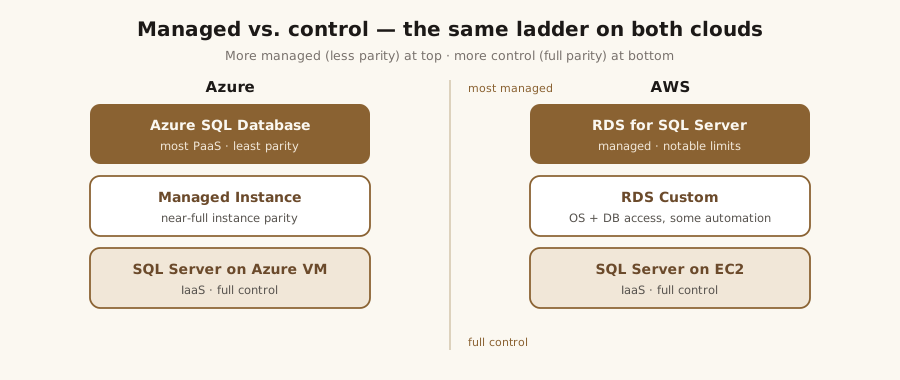
The options: the Azure side
Azure gives you three rungs on a ladder from most-managed to most-control:
- Azure SQL Database — the fullest PaaS. Serverless and elastic-pool options, automatic HA, but the least instance-level parity (no SQL Agent, no cross-database queries in the classic sense).
- Azure SQL Managed Instance (MI) — near-full instance parity: SQL Agent, cross-database queries, CLR, Service Broker, and more, still delivered as a managed service. This is the natural landing spot for a lift-and-shift that needs instance features.
- SQL Server on an Azure VM — full control, full parity, and full responsibility. You run it; Azure runs the hardware.
The options: the AWS side
- AWS RDS for SQL Server — a managed SQL Server instance, but with notable limits: no
sa/sysadmin, SQL Server Agent is present but with restrictions, and several instance-level features (certain cross-instance, filestream, and server-configuration items) are constrained or unavailable. Backups and native restore work within RDS's model rather than yours. - RDS Custom for SQL Server — a middle ground that gives you OS and database access while keeping some automation, for workloads RDS proper can't accommodate.
- SQL Server on EC2 — the full-control equivalent of a VM: you own patching, HA, and backups.
Cost and licensing
Cost is rarely the single number the pricing page shows. Watch the same levers on both clouds:
- License-included vs. bring-your-own-license (BYOL). Azure's Hybrid Benefit lets you apply existing Software Assurance licenses; AWS supports license-included and BYOL via dedicated hosts.
- Reserved capacity / reserved instances for steady workloads — often the biggest lever.
- The hidden line items: provisioned storage and IOPS, backup storage beyond the free allotment, cross-region and egress traffic, and the multiplier that HA tiers (zone-redundant, Multi-AZ) add.
High availability and disaster recovery
- Azure — built-in HA on the PaaS tiers, optional zone redundancy, and auto-failover groups for geo-DR with a stable listener endpoint.
- AWS RDS — Multi-AZ for synchronous standby HA, and cross-region read replicas you can promote for DR.
Both handle the mechanics of failover; both still leave DR design — RPO/RTO targets, runbooks, testing — to you. Managed HA is not the same as a disaster-recovery plan.
Feature limits and what you lose in PaaS
This is the section that decides most migrations, and it deserves a real comparison. Run your workload against a parity checklist:
| Capability | Azure SQL DB | Azure SQL MI | Azure VM (IaaS) | AWS RDS | AWS EC2 (IaaS) |
|---|---|---|---|---|---|
| SQL Server Agent | No | Yes | Yes | Limited | Yes |
| Cross-database queries | Limited | Yes | Yes | Limited | Yes |
| CLR / Service Broker | Limited/No | Yes | Yes | No | Yes |
| Linked servers | Limited | Yes | Yes | Limited | Yes |
sysadmin / OS access |
No | No | Yes | No | Yes |
| Patching & HA managed | Yes | Yes | No | Yes | No |
On AWS RDS, Service Broker isn't supported and CLR is unsupported on SQL Server 2017 and later; the cross-database "Limited" refers to cross-instance/distributed queries — ordinary three-part-name queries within the same instance work normally.
The pattern is consistent, and it's symmetric across both clouds: the more the platform manages, the more instance-level features you surrender. Azure SQL DB and AWS RDS are the most-managed, least-parity rungs; Azure SQL Managed Instance sits in the pragmatic middle; and SQL Server on an Azure VM and on AWS EC2 are the full-control, full-parity ends — the IaaS option exists on both clouds, and either is the answer when a workload needs sysadmin, the OS, or a feature the managed tiers don't expose.
When to choose which
- Need full parity with minimal change → SQL Server on a VM/EC2 (lift-and-shift), or Managed Instance / RDS if you can live with their specific limits.
- Greenfield app, elastic scale, minimal ops → Azure SQL Database.
- Already committed to one cloud → default to that cloud's managed option, and only step down to IaaS if a specific feature blocker forces it.
Migrating either direction is its own project — assessment, method, cutover, rollback — and the sequence is the same one in the SQL Server migration playbook. If you're weighing the move, that's exactly what cloud DBA consulting is for. See cloud and automation work or get in touch.
References
- Azure SQL — Database vs. Managed Instance vs. VM — Microsoft Learn. Azure sql iaas vs paas what is overview — Microsoft Learn
- Amazon RDS for SQL Server — features & limitations — AWS Documentation. CHAP SQLServer — AWS docs
- Azure Hybrid Benefit — Microsoft Learn. Azure hybrid benefit — Microsoft Learn